Send Self-Service
Share with your customers: • Digital forms • Interactive flows • Self-service tasks All without leaving Zendesk.
About this app
Send Self-Service - Empowering Customer Self-Service Inside Zendesk
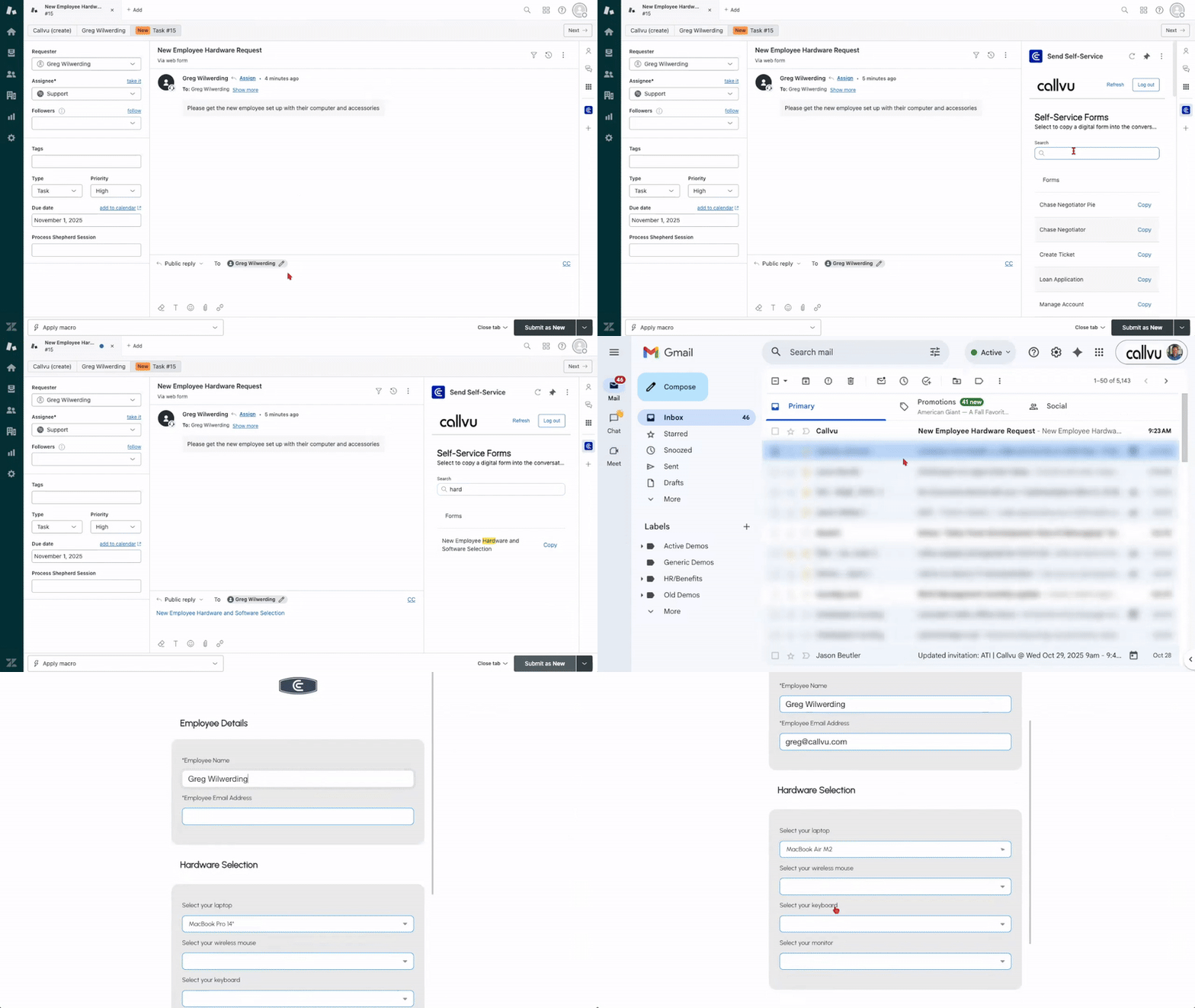
The Send Self-Service app extends Zendesk Support by enabling agents to send interactive digital forms, guided workflows, and self-service tasks directly to customers without leaving Zendesk. Customers can securely complete forms, provide required details, or resolve simple issues on their own while agents maintain full visibility within the ticket.
Key capabilities include:
• Create and send digital forms, microsurveys, or verification flows within tickets.
• Launch step-by-step guided interactions for data collection and validation.
• Eliminate manual follow-ups by capturing structured data automatically in Zendesk.
• Maintain ticket context so both agent and customer stay aligned.
Built on the Callvu platform, Send Self-Service uses the same no-code micro-app builder trusted by enterprises to deploy secure digital experiences across channels. Every form or workflow can be customized, updated, and reused without code, ensuring rapid time to market and consistent brand experience.
Beyond simple forms, Callvu’s AI tooling allows you to introduce logic-based decision paths and dynamic prompts that adapt to customer inputs. You can also connect these workflows to backend systems through secure APIs, or orchestrate them with other bots using Callvu’s Multi-Channel Collaboration Protocol (MCP).
Compliance and security are foundational. Callvu meets enterprise standards including SOC 2, GDPR, HIPAA, and PCI-DSS. All data collected through the Send Self-Service app is encrypted and stored according to Callvu’s compliance policies.
To learn more about how Callvu protects your data, visit our Privacy Policy: https://callvu.com/privacy/
Send Self-Service delivers faster resolutions, improved accuracy, and a modern, guided experience for every Zendesk interaction — powered by Callvu’s intelligent digital engagement platform.
App 詳情
如何安裝
Prerequisites:
• An active CallVu Studio account. To get started:
Visit https://studio.callvu.net/callvu-studio/home
Sign in to CallVu Studio
Create and publish at least one form
• Ensure you have at least one published form in your account
Installation Steps:
• Your published forms will appear automatically
Troubleshooting:
• If forms don't appear, verify your forms are published in CallVu Studio.
留下評論
與其他 Zendesk 社群分享您的體驗