全新
Free Shopify Order Actions
Refund, cancel, edit and re-order Shopify orders from the ticket. Free, no per-agent fees.
相容於
Support
開發人員
AdelanteAbout this app
Fix the order without leaving the ticket
A customer writes in: wrong size, new address, charged twice. Your agent opens Shopify in another tab, hunts for the order, makes the change, comes back, and types out what they did. On a busy day that's dozens of tab switches per agent, and every one of them is time the customer waits.
Free Shopify Order Actions puts the customer's Shopify orders in the ticket sidebar and lets agents change them right there: refund, cancel, edit the address or the items, re-order, or build a new order. It's free: every feature, every agent, every store, no trial clock and no per-agent fees. Paid Shopify apps for Zendesk charge $24–34 per agent per month for the same order edits.
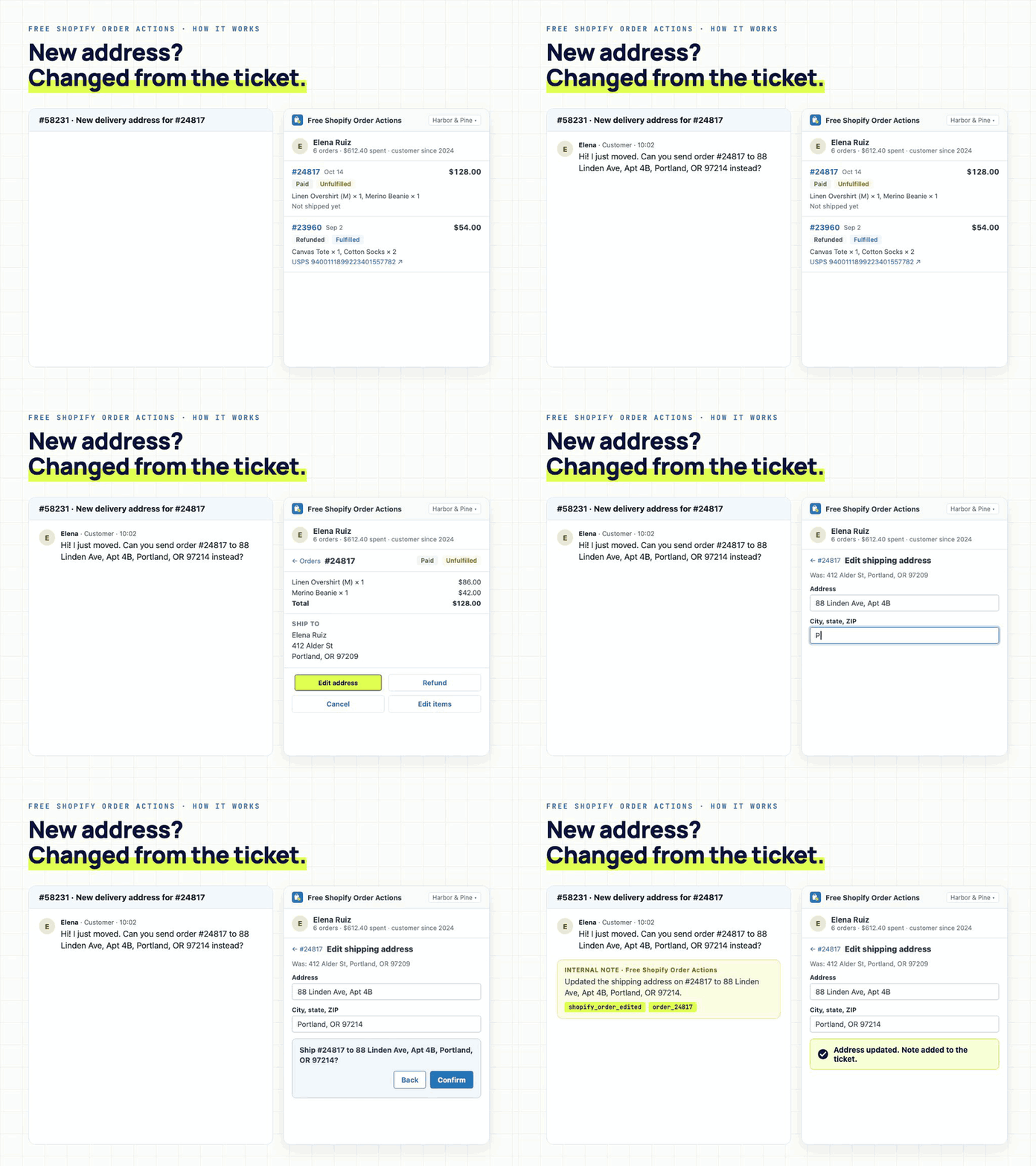
What agents can do from the sidebar
- See every order at a glance: order number, items, total, payment and fulfilment status and the tracking link, right in the list. No extra clicks to find the basics.
- Search orders by number, email, name or phone, across all your stores.
- Refund: full, partial or per item, with restock and shipping refund options.
- Cancel: pick a reason, refund, restock and notify the customer in one step.
- Edit the shipping address before the order ships.
- Edit items: add a product, remove one, or change a quantity on an open order.
- Re-order: duplicate a past order as a draft and send the customer a checkout link.
- Create a new order: search your catalog, build the cart, send the invoice.
- Insert into reply: drop the order number, status, items and tracking link into your reply.
- Pin the order to the ticket, so the next agent sees it straight away.
Every change asks for confirmation first, then adds an internal note and a tag (shopify_refund, shopify_cancelled, shopify_order_edited, shopify_reorder) so Explore can report on it.
Built for how support teams work
- Works on new tickets before they're saved, and on the customer's profile, not just saved tickets
- Works on Support-only plans, no Chat licence needed
- All your Shopify stores in one app, with a store switcher and search across them, not one sidebar app per store
Matches the customer by email or phone automatically
Looks and feels like Zendesk, because it's built with Zendesk's own design system
One click opens the order in the right Shopify admin when you need the full page
Price
Free. Every feature, unlimited agents, stores and order actions. No trial clock, no per-agent fees, no billing step.
Install it free and connect your store in under a minute. Full details: getadelante.com/apps/free-shopify-order-actions
Your data
The app connects to Shopify through Shopify's own OAuth approval and only acts when an agent confirms an action. Order data is fetched live from Shopify and shown in the sidebar; we don't store order or ticket content. Data is encrypted in transit (TLS 1.2+). Adelante is HIPAA and GDPR compliant, and ISO 27001 and SOC 2 Type II certified. Security questions: help@getadelante.com
Every refund your team clicks is one an AI agent could handle. Our Shopify AI Agent answers order status, returns, cancellations, address changes and order edits end to end inside Zendesk, and hands off to your team with full context when a human is needed. It uses the same Shopify connection, so turning it on takes a minute. Search "Shopify AI Agent by Adelante" in the Marketplace.
App 詳情
如何安裝
1. Install
Click Install. Free Shopify Order Actions appears in the ticket sidebar.
2. Activate
Open any ticket, enter your company name and click Continue.
3. Connect Shopify (admin)
Enter your store's myshopify.com address and click Connect Shopify. Approve the app in Shopify. The window closes and your customer's orders appear. Repeat for each store.
4. Try it
Open a ticket from a customer who has ordered. Their orders show in the sidebar; click one to refund, cancel, edit or re-order.
Need help? help@getadelante.com
留下評論
與其他 Zendesk 社群分享您的體驗